 Shewiun
- The situation
- A finance team wants an agent to propose supplier payments under 5,000 euros. A mistake or a manipulated instruction would move real money.
- What the workspace enforces
- The Ledger agent may analyse and propose, nothing more. The Sentinel agent is read-only. Payments need a person to approve, and the approval is logged.
- What the team can show
- A council decision with the sceptic's dissent on record, a verified audit chain and a self-test report that tried to cross these limits.
AI agent governance workspace
AI agents your security team can sign off.
Shewiun is the workspace where AI agents debate, remember and act, with per-agent permissions, quarantined memory, human approvals and a tamper-evident audit log.
Free plan, no credit card. A demo workspace with sample agents loads in one click.
- Hash-chained audit log
- Per-agent permissions
- Human approval for write actions
- Bring your own model
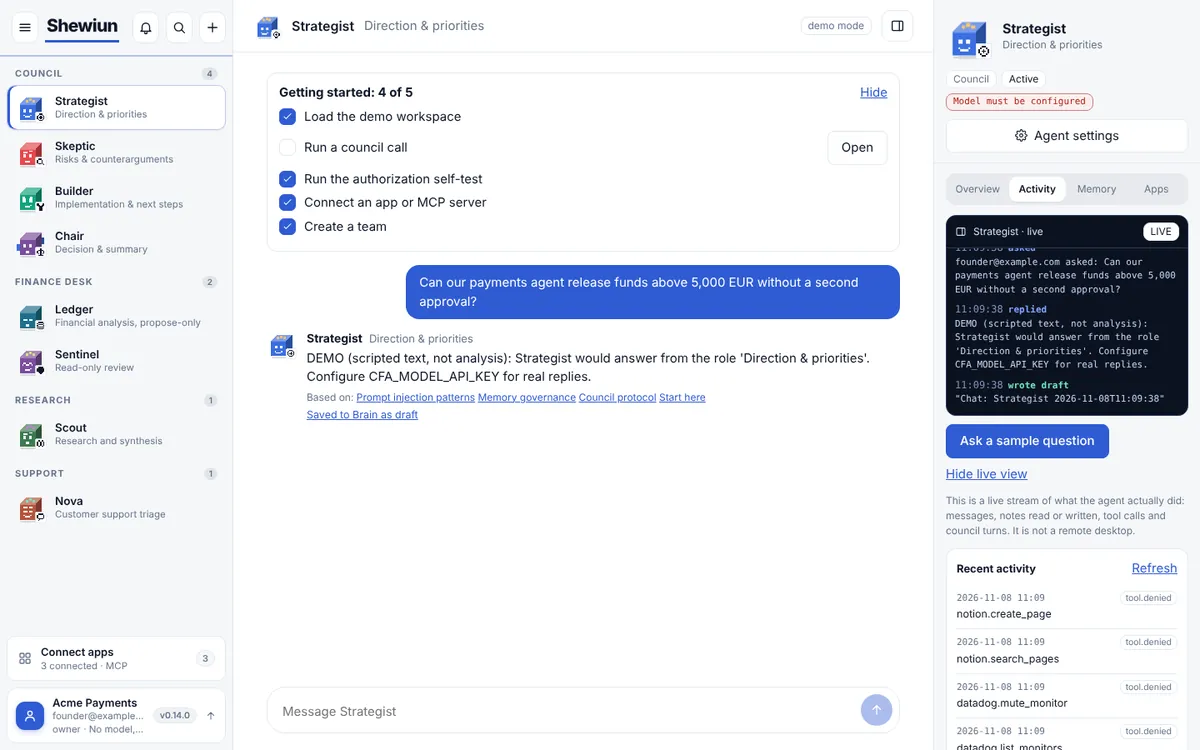
Agents can act. Can you show what they did, and why they were allowed to?
An agent that remembers and calls tools can also be manipulated: poisoned notes, hidden instructions in tool output, rights nobody reviewed. Teams hesitate for good reasons.
Unclear rights
Agents inherit broad access because nobody wrote down what each one may do.
Memory that can be poisoned
Whatever an agent reads or writes can end up in the next prompt without a review.
No proof for the auditor
When something goes wrong there is no trustworthy record of who decided what.
See the real workspace
These are screenshots of the running product with demo data, not mock-ups. Pick an area.
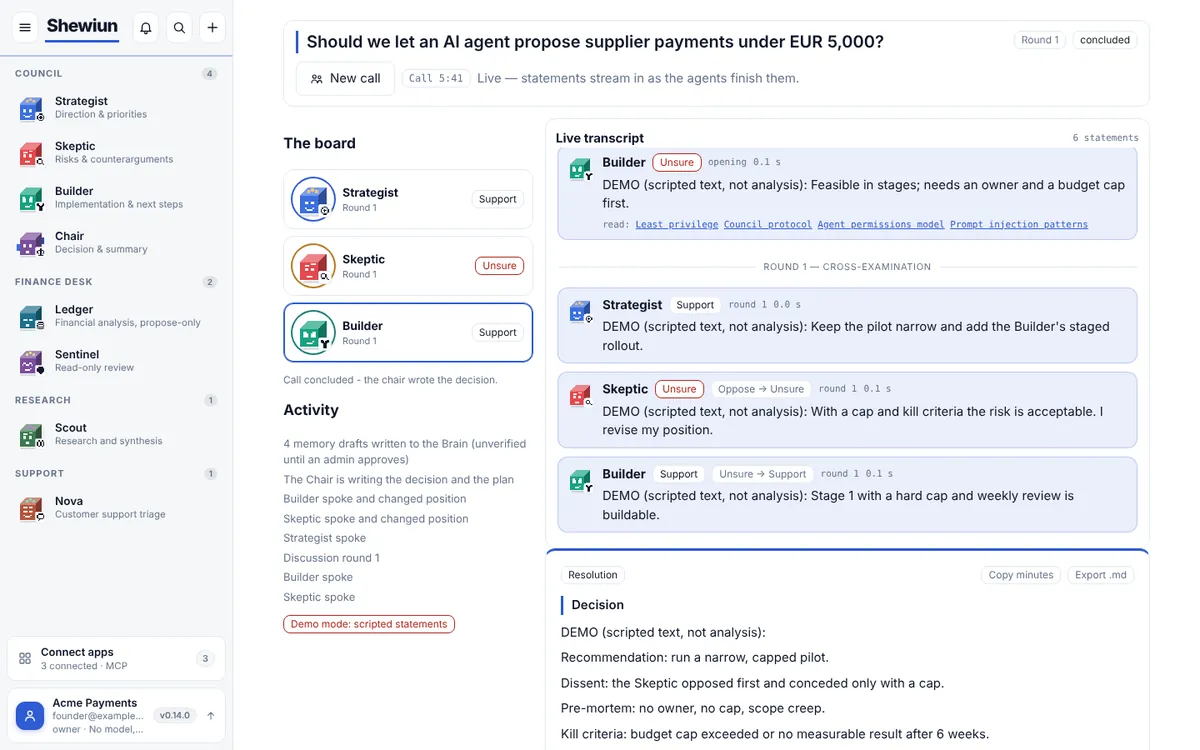
Decisions with dissent on record
Agents answer independently first, then respond to each other and may change position. The Chair writes the decision, a pre-mortem and a plan. Disagreement stays in the record.
- Independent first answers, then cross-examination
- Memory drafts written to the Brain, unverified until an admin approves
- Export the minutes as Markdown
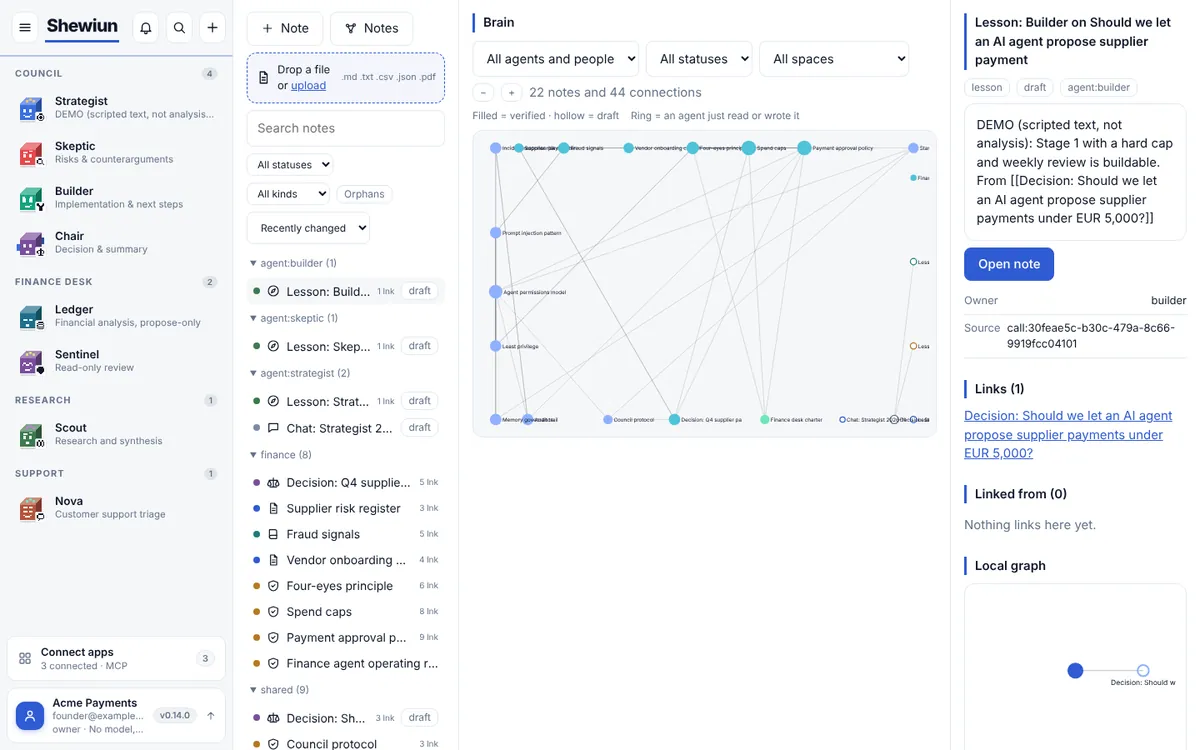
Memory you can trust
Everything an agent learns arrives as a draft. Only notes an admin has verified reach a prompt. Instruction-like text is quarantined and every version is kept.
- Draft, verified and quarantined states
- Linked notes with a live graph
- Full version history for every note
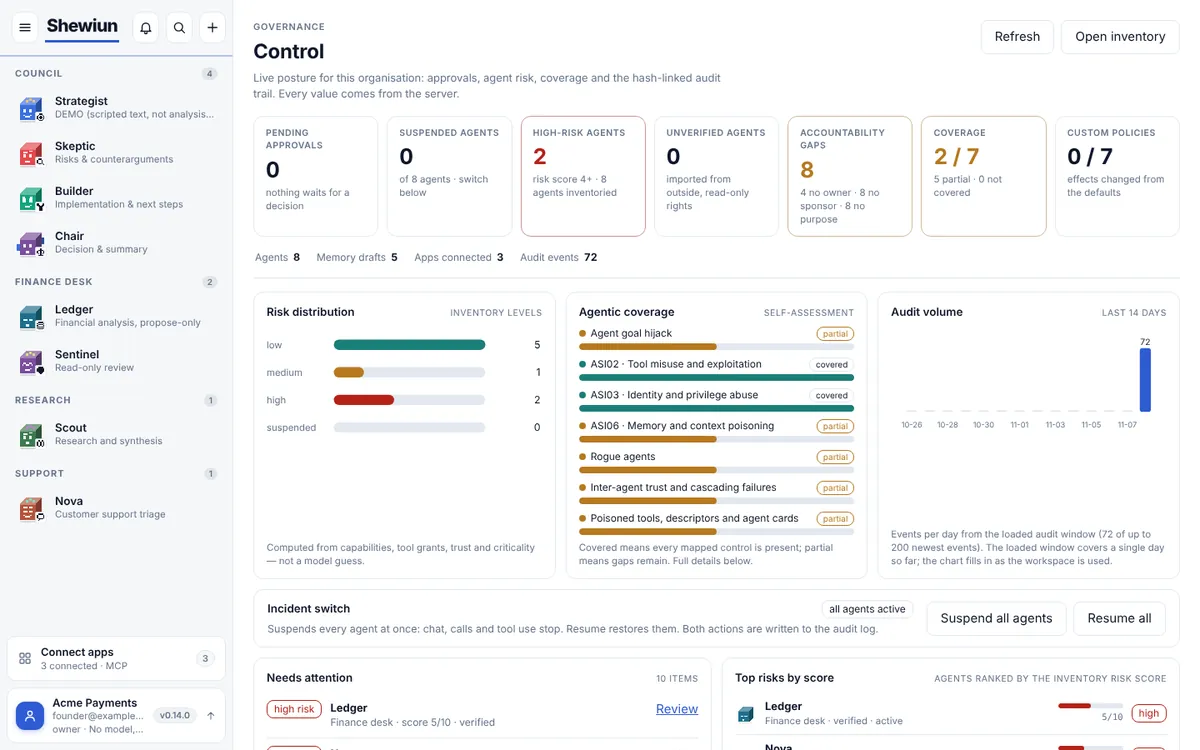
One place for risk, approvals and audit
Live posture for the organisation: pending approvals, risk by agent, coverage against known agentic risks and a hash-linked audit trail. An incident switch suspends every agent at once.
- Risk score per agent from capabilities, grants and trust
- Coverage view against the OWASP agentic risk list
- Suspend and resume all agents, written to the audit log
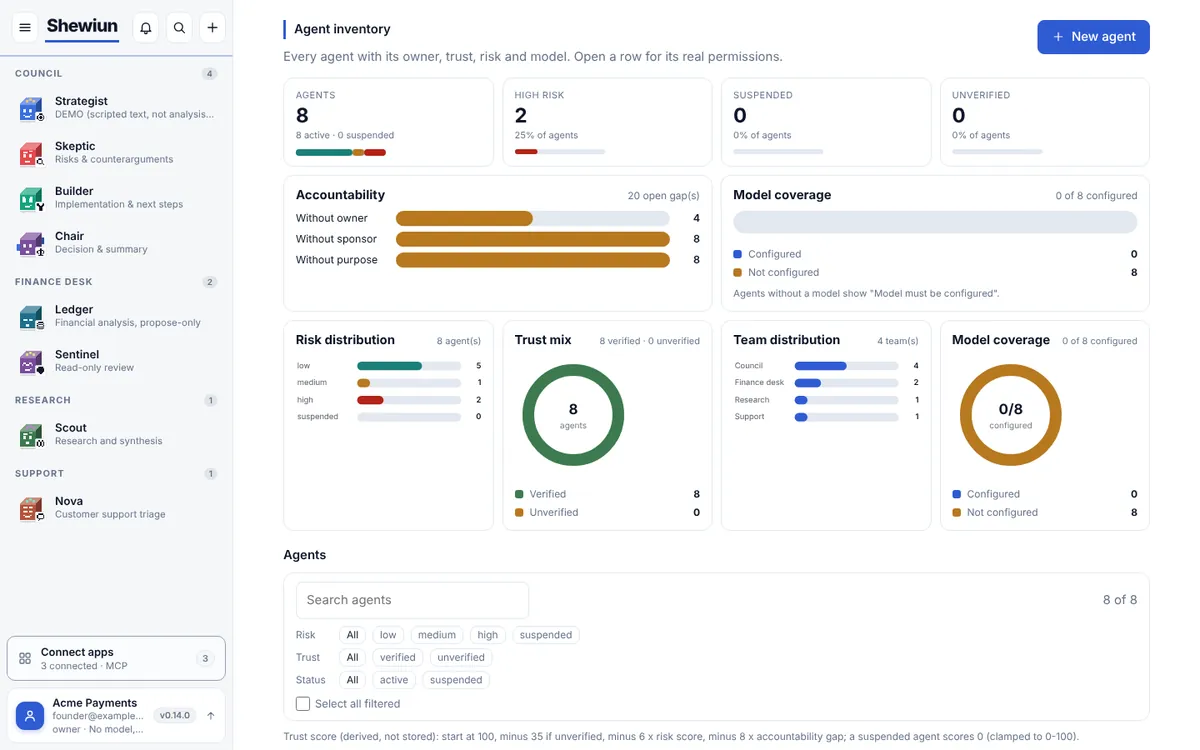
Every agent, its owner and its risk
A register of all agents with owner, sponsor, purpose, trust level and criticality, so nobody has to ask which agents exist and who is responsible for them.
- Owner, sponsor and purpose per agent
- Imported agents start unverified and read-only
- Filter by risk, team or status
A workspace your whole team can use
Members with five roles from viewer to owner, invitations, announcements and billing with plan, MRR and invoices through Stripe. Simple, no setup maze.
- Viewer, developer, security manager, admin, owner
- At least one owner always remains
- Billing and invoices in the same place
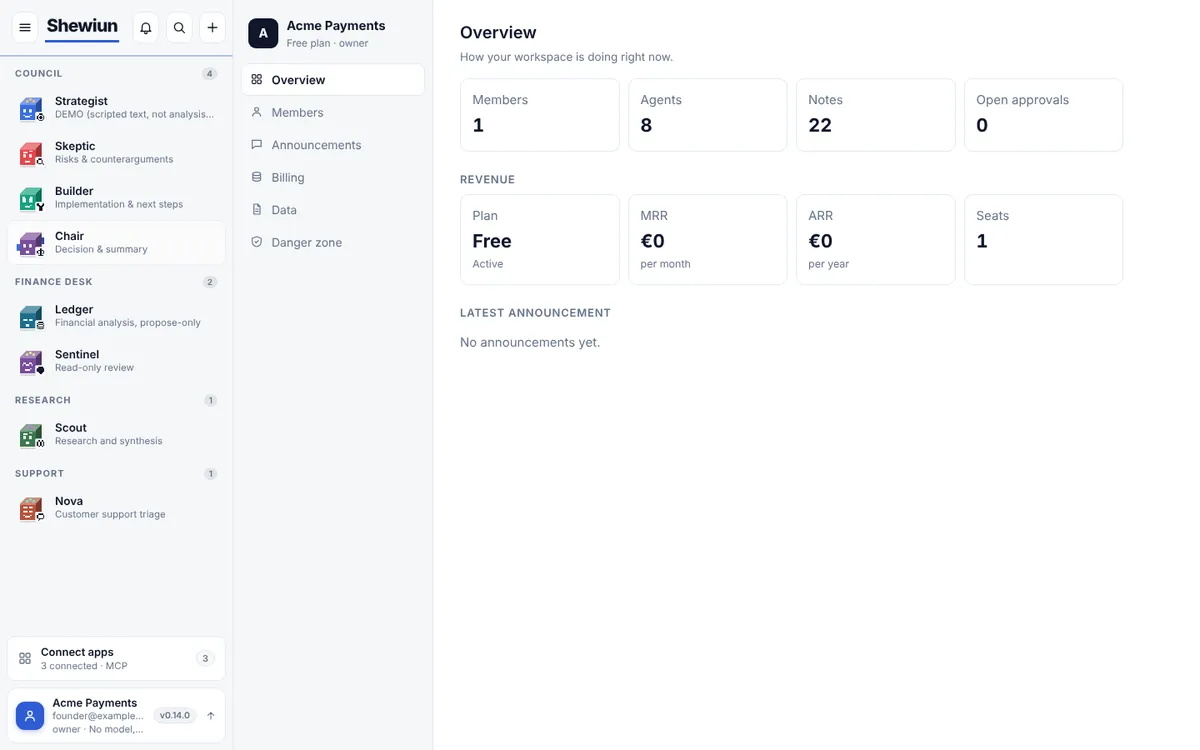
Screenshots show the demo workspace. Without a model key, agent statements are scripted and labelled "DEMO" in the product.
Everything between "agent" and "approved"
Eight building blocks that turn a pile of agents into something a security team can review.
Rights per agent
Each agent has its own capabilities and tool grants. Write tools only create an approval request, and secret-looking tools can never be granted.
Memory you can trust
New knowledge arrives as a draft. Only verified notes reach a prompt, instruction-like text is quarantined and every version is kept.
Council with dissent
Agents answer independently, then challenge each other. The decision, the pre-mortem and the disagreement stay on record.
Human approvals
Consequential actions wait for a person. Approvers see who asked and what for, and every decision is logged.
Tamper-evident audit log
Events are chained with hashes, so a changed or removed entry shows up when you verify the chain.
Authorization self-test
Synthetic probes try to cross the boundaries your workspace enforces and produce a report you can share with an auditor through a private link.
Live apps through MCP
Connect MCP servers and a catalog of apps. Tools stay off until you grant them to an agent, and you can revoke them in one click.
Teams and organisations
Invite people with roles from viewer to owner, share team memory and channels, and keep billing in the same workspace.
From first agent to audit report in three steps
Open a workspace
Create your organisation in under a minute. Load the demo workspace to see agents, notes and a finance desk with realistic permissions.
Set the boundaries
Decide per agent what it may read, write and call. Write tools route to a person for approval. Connect only the apps you want.
Run it and prove it
Hold council calls, watch what agents do live, run the authorization self-test and verify the audit chain before you share a report.
Walkthrough: a payments agent with write access
The demo workspace ships with a finance desk. This is what it demonstrates, step by step.
Demo walkthrough, not a customer story
We are looking for early teams to run a pilot with. Tell us about your agents.
Simple pricing, in euros
Start free. Upgrade when you need more agents, seats or longer audit history. Paid plans are billed monthly through Stripe.
Free
€0 / month
Try it with your own notes
- 4 agents
- 3 team members
- 50 agent messages per month
- 7 days audit history
Starter
€29 / month
For one person running real work
- 10 agents
- 10 team members
- 1,000 agent messages per month
- 1 live MCP server
- 30 days audit history
Most popular
Professional
€99 / month
Team governance with live tools
- 25 agents
- 25 team members
- 5,000 agent messages per month
- 5 live MCP servers
- 90 days audit history
Enterprise
Custom
Custom limits, invoiced
- 100 agents and 200 seats included
- Higher usage limits
- 365 days audit history
- Security questionnaire and pilot support
Launch prices and limits may change. The plan you start on stays as shown in the app until you change it.
Questions we hear first
What is Shewiun?
Shewiun is a web workspace for teams that put AI agents to work. Agents get their own permissions, memory and tools. People approve consequential actions, and everything is written to a tamper-evident audit log.
Who is it for?
Teams that already run or plan to run agents with write access: security and platform teams that have to sign off, and founders who want to ship agents without losing control. Financial services is our first focus.
Does Shewiun replace my model provider?
No. Bring any OpenAI-compatible endpoint or open models through Hugging Face Inference Providers. Without a model key the workspace runs scripted demo answers, clearly marked as such.
Can an agent act without approval?
Only if you allow it. Read access follows the permissions you set per agent. Write tools create an approval request that a person must accept, and secret-looking tools can never be granted.
How does the audit log prove anything?
Every event stores the hash of the previous one. The verify function recomputes the chain, so an edited or deleted entry breaks it. This shows tampering inside the log. It does not replace your own backups.
Is Shewiun certified, for example SOC 2?
Not yet. The trust page lists what is enforced today and what is not, and we can send our security questionnaire answers on request. We would rather tell you this plainly than imply a certificate.
Where is my data stored and can I leave?
Each organisation is isolated in its own scope. You can export all of your organisation data as JSON at any time from the Organisation page, and delete the organisation yourself. The privacy policy lists the processors we use.
How much does it cost and can I cancel?
The Free plan costs nothing. Paid plans are billed monthly through Stripe and you can cancel in the app, with changes taking effect at the end of the billing period. See the pricing section for current limits.
How fast do you answer questions?
We reply to every message within 1 business day. Use the contact form or the button on this page.
Put your agents under control today.
Open the workspace, load the demo and see permissions, approvals and the audit log working together.
Open the workspaceQuestions first? Write to us. We reply within 1 business day.